



What Is the Stanford Tax Organizer?
The Stanford Tax Organizer is a secure online questionnaire and document portal your Smith Leonard tax professional sent you to collect your tax information for the current tax year.
- It is personalized based on your prior-year tax data (if available).
- It automatically builds a custom list of income sources, deductions, and credits you need to report.
- You will complete questions online and upload documents where needed.
How to Access Your Organizer
You should receive an email with a unique link to open your Organizer.
- Click the link in the email — you do not need a username or password.
- Your Organizer will open in your web browser.
- Click the blue Send Verification Email button. An email will be sent to the same email address used to access the link.
- Open the verification email and click on the Verify Email button.
- Enter the last four digits of your Social Security Number.
Be sure to save or bookmark the link you receive so you can easily access your Organizer in the future.
Completing Your Information
When you log in to the Stanford Tax Organizer, you will see two main sections:
Complete Questionnaire
This section asks you a series of questions about your tax situation. It includes sections such as:
- Personal information
- Dependents and household details
- Income
- Deductions and credits
- Other tax-related questions
Simply click on the blue Enter Questionnaire button when you are ready to begin.
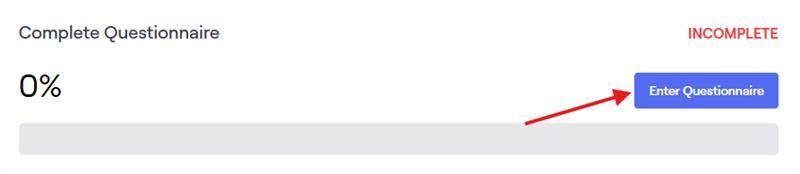
When completing the questionnaire:
- Read each question carefully before answering.
- Use the Back and Next navigation buttons at the bottom of the page to move between questions.
- If a question does not apply to you, select “No” or “None.”
- Some answers may already be filled in from prior-year information. Please update as necessary.
- Some questions will allow you to type in free text or select from a list.
- Click the blue Complete questionnaire button when you have finished answering all of the questions.
- If you need help, reach out to your Smith Leonard tax professional for guidance.
Upload Your Documents
In this section, you can upload copies of your tax documents (such as W-2s, 1099s, K-1s, and other statements).
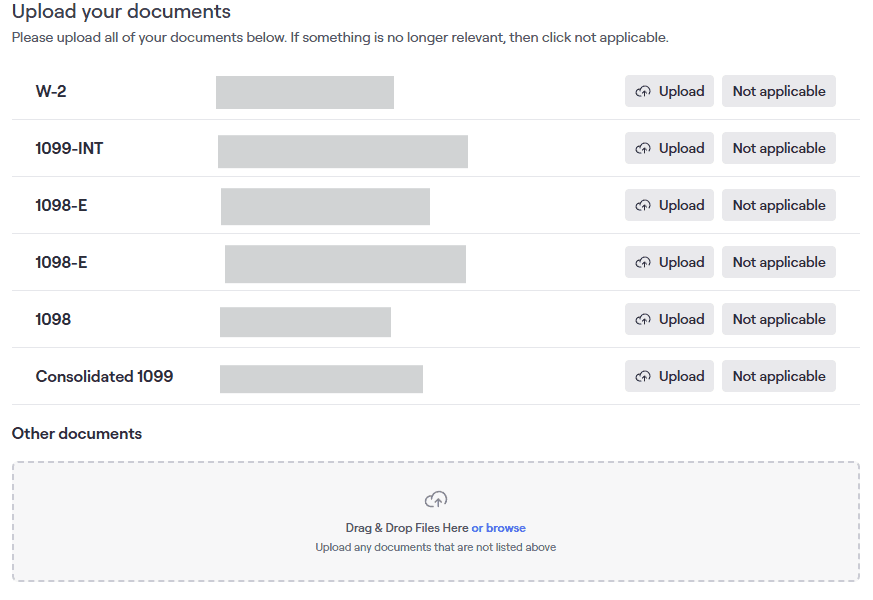
For Existing Clients:
- Tax documents are listed individually based on the forms we received last year.
- Click the Upload button to submit the corresponding tax document for the current year.
- If you do not need to upload a specific tax document, click the Not applicable button and use the drop down to provide us with a reason.
- Use the Other documents section to upload any other tax documents that you may have received.
For New Clients: Simply use the Other documents section to upload your documents.
Note that the following file types may be uploaded:
- PDF files (Preferred)
- Images (JPG/PNG)
- Scanned forms (min. scan resolution of 300 dpi required)
If you access your Organizer with a phone or tablet, you will also have the option to take a picture of your tax documents with your camera app. When using this option, please be sure to move your phone as close to the form as possible in order for us to see your information clearly.
Saving and Returning Later
Your Organizer saves automatically. You may close your browser and return later using the same link from your original email.
Review & Submit
Once you submit your Organizer, our team will download your documents and your Organizer will be locked. No additional uploads or changes can be made. Please be sure all documents are uploaded before submitting. If you need to provide additional information afterwards, please reach out to your Smith Leonard contact directly and request that your Organizer be unlocked.
Before submitting:
- Review all answers to ensure accuracy.
- Check that each required upload is complete (you’ll see status indicators or check marks as you finish).
- Click the Submit button at the end of the Organizer when complete.
Once submitted, your data will be transmitted to Smith Leonard securely.
After Submission
Your preparer will begin preparing your return based on the information you provided. If additional information is needed, your preparer may send you:
- Another Organizer request.
- A secure message asking for more documents.
Common Tips & FAQs
Q: What if I haven’t received all of my forms to upload?
A: Don’t worry, simply upload what you do have. You can send missing documents later using the same Organizer link.
Q: Will my information be secure?
A: Yes. The Organizer uses secure access and industry-standard protections for all data.
Q: Can I complete this on my phone or tablet?
A: Yes. The Organizer works on most devices with a web browser.
Q: I lost my link — what do I do?
A: Reach out to your Smith Leonard contact and request a new Organizer link.
